Posts

Showing posts with the label Intel Real Sense

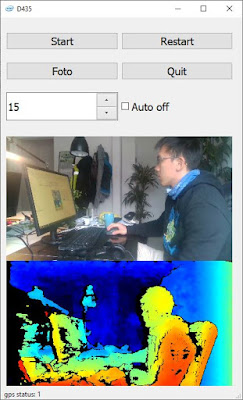
RealSense 學習筆記/教學/分享(六):PyQT製作介面GUI

Image
GUI: graphic user interface 要給其他同事使用務必要做成有介面 所以就在主要程式都完成後,開始這部分 我做了兩版,Tkinter跟PyQt Tkinter真的太2000年了 雖然是內建很方便,但是就是要用新一點的 最後做出來的是如下: GitHub   https://github.com/soarwing52/RealsensePython/blob/master/proccessor.py

專案簡介:深度相機的應用 從資料蒐集到資料應用 萬能的Python呀 請賜與我神奇的力量!

Image
這是我這半年來主要的大專案,中間用了許多不同的組成,分成許多小專案開發 目前公司的主要業務為道路調查,類似街景車的在各道路、產業道路拍照 而本案的需求是公司想要有可以測量的照片 從硬體選購-深度相機程式開發與測試-實地測試-視覺化GUI製作由我獨立完成 中間有使用到的一些程式庫有: 電腦視覺 opencv GPS Port應用 Realsense 程式庫 PyQt, Tkinter的GUI Flask app ArcGIS/QGIS 插件製作

Roadmap: Real Sense Application

Image
The RealSense application is a solo project combined many different components I created during my job in the road surveying company As the idea of the project is to let colleagues can measure objects such as road width, sidewalk, and even cracks. Since the implementation can't simply program through it, this project has: Hardware selection, Computer Vision, Location Service, Depth Camera Library, GUI visualization Further development with ArcGIS/QGIS plugin creation, Flask web-framework

六個禮拜做出了遙控深度相機!? Raspberry Pi +Realsense簡介

Image
身為一個程式新手,有機會碰到Raspberry Pi,就想做一個越級挑戰的計畫 最終從拿到Pi到現在做出一個大致可用的Prototype 現在六個禮拜啦 現在我來大致介紹一下我的專案

Raspberry Pi + Realsense: MIT App Inventor

Image
So when I found this, this is my savior with no knowledge of JAVA I thought an app is impossible but I found this youtube video this showed that with Request of Simple HTTP server and GET request I can connect them So he's the inspiration of the whole project, thanks ADEL KASSAH!!

Raspberry Pi + Realsense: Git

Image
So I finally get the chance to work on git more often. before just working one the same laptop, or copy it to another like a noob. Since Pi is not connected to the company network of files, and I dont have more usb sticks around, I use git now

Raspberry Pi + Realsense: Usage of class, PyQT

Image
So not only did this project helped me know more about tcp transmission and also helped my old scripts I based on the structure and with minimum change I made a pyQT version of the camera app

Raspberry Pi + Realsense: Flask server

Image
I would start first with the easy part, Flask Flask is a micro framework to set up at server, app and without setup like the whole Django file structure framework. The good part is the variable they use is quite similar, because template of jinja2 and django is very similar the code:  https://github.com/soarwing52/Remote-Realsense/blob/master/flask_server.py

Project introduction: Tablet control Raspberry Pi with Realsense Depth Camera

Image
The whole Realsense D435 project started long ago, I was working with it the whole year actually, and I have more records I started on my working laptop, then need to run it on old road survey laptop, which is a lot weaker and with a long usb cable connecting from the laptop on the side seat to the camera set on the front top of the car, it is just not as satisfying. As the new pi has usb3 port, this is a good choice to update the things a bit. the final result is on Github

RealSense learning/turtorial/sharing blog - Chapter Five: Measuring

Image
The math of the distance between two points is really easy, just square(x^2 +y^2 +z^2) but how to implement it into the program and let it show on a GUI, then combine with GIS platform is the task

RealSense learning/turtorial/sharing blog - Chapter Four: Frame Issues

Image
What is the next step after getting the frames? while examining the collected data, there are some issues needed to be fixed, and this post will focus on this part The visualization will use openCV and the example file will be: https://github.com/soarwing52/RealsensePython/blob/master/phase%201/read_bag.py

RealSense learning/turtorial/sharing blog - Chapter Three: Frame control

Image
In the last post  we finished the adjustments of the camera This part will work on the frames. getting the frames is the first step of the data Explaining the content of the frame class and its instinces

RealSense 學習筆記/教學/分享(五):用新的相機程式碼解釋Multiproccesing

Image
之前完成的相機程式跟Arcmap plugin都做好之後,就正式投入使用啦 不過中間也是經過幾般波折,出去測試半天之後,還在調整 然後說想要再測試,結果直接被派了一個三天兩夜... 完全傻眼的結果,於是就在車上邊調整程式碼 然後呢,當我弄到夠自動化可以司機自己去時,我發現我沒有電腦了,因為被帶走了 於是公司又給了我一台,可是呢,果然,又是一個2014年的基本款文書機 4GB ram,HDD,唯一可以的大概就...i5 這樣

RealSense 學習筆記/教學/分享(四):計算兩點實際距離

Image
好的,錄製了深度跟色彩兩幅畫面並且把他們配對好之後呢,接下來就是主要任務了 要計算兩點的距離 如果說要介面,Python已經有十分多的選擇可以選 我最後選了matplotlib來作為工具

RealSense 學習筆記/教學/分享(三):幀的控制

Image
前面那篇 在機器的控制端準備好了之後,接收到的資料要怎麼處理呢? 就讓我在這篇裡面介紹 主要本篇在於視覺化 用opencv為主 適用的範例是這個: https://github.com/soarwing52/RealsensePython/blob/master/phase%201/read_bag.py

RealSense 學習筆記/教學/分享(二):裝置控制

Image
有些人問我 明明工作看起來也不錯 薪水 環境都不錯 為什麼我還在找? 先看看以下影片 這是去年的發表,當辦公室仍在用2000或是更久以前的方法 花許多時間/人力/眼力的同時 這樣的算法已經準備隨時取代掉這些工作了 你說我會不會怕? 當然會,所以要找能夠更未來性的工作 而不是在這樣養老的小鎮 已暫時的安穩而滿足,必須更向前啊!

RealSense learning/turtorial/sharing blog - Chapter Two: More Device Adjustments

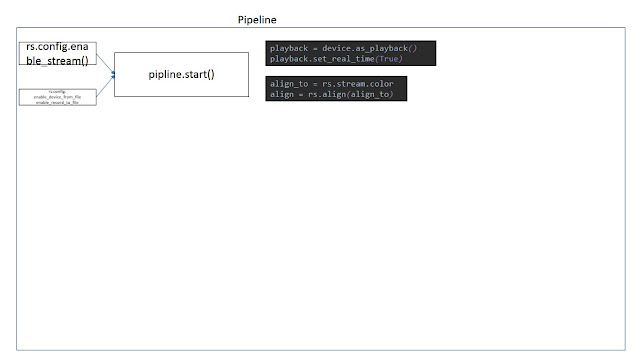
So, after the hello world, more controls over the device. So the pipeline is basically start/stop, and wait_for_frames And the function of pipeline_profile I haven't know yet in this part I will put in the controls before wait_for_frames, including record file, read file, and others

RealSense 學習筆記/教學/分享 (一):Hello World

Image
當然 所有程式的開始都是 Hello World 這個也不例外 第一個功能,就是開啟相機,然後偵測畫面中央的深度距離相機多遠 我的成果如下: https://github.com/soarwing52/RealsensePython/blob/master/phase%201/Hello%20World.py ---------------------------------------------------------------- 求助區 目前對於 syncer poll_for_frame - 4/23已解 playback().seek - 4/24 嘗試中 這幾個我還無法成功使用 麻煩有看到的前輩指導了 然後目前還有拍照的的時候落幀的問題 必須關掉自動曝光才能夠完整錄到 但是當然需要自動曝光才能夠實際外拍啊 4/24: auto_exposure_priority關掉就解決了 ------------------------------------------------------------------

RealSense 學習筆記/教學/分享-序篇:開始與安裝

Image
因為工作的關係,老闆決定買了Intel D435的深度相機 然後就叫我做出他們未來可以測量照片裡面物體的大小 大概就是萊卡他們的產品那樣 我們公司做的是道路資料蒐集road survey

RealSense learning/turtorial/sharing blog - Chapter One:The Start, Install and Hello World

Image
It's been one month I’ve been working on this Intel realsense D435, and still I’m not so sure with a lot of functions and some parameters. Like when to add () and when not, which function need which parameter to fit in. First I read the https://buildmedia.readthedocs.org/media/pdf/pyrealsense/dev/pyrealsense.pdf And the python.cpp in the python wrapper to find the options Actually it didn't help much, mainly I started with the examples in python wrapper and then read the corresponding codes in the C++ example. It is also because this project is to measure objects in the picture, and in the example there is already one measuring in stream, so translating that code is the first approach. And here https://pyrealsense.readthedocs.io/en/master/index.html

Contact Me!